
| 일 | 월 | 화 | 수 | 목 | 금 | 토 |
|---|---|---|---|---|---|---|
| 1 | 2 | 3 | 4 | |||
| 5 | 6 | 7 | 8 | 9 | 10 | 11 |
| 12 | 13 | 14 | 15 | 16 | 17 | 18 |
| 19 | 20 | 21 | 22 | 23 | 24 | 25 |
| 26 | 27 | 28 | 29 | 30 | 31 |
- AWS
- OS
- java
- Operating System
- kubectl
- PostgreSQL
- docker
- tcp
- CVAT
- Network
- helm
- kubeadm
- dns
- aws s3
- Spring
- kubernetes
- jvm
- airflow
- Python
- ip
- CSV
- zookeeper
- JavaScript
- Kafka
- Terraform
- Packet
- EC2
- log
- MAC address
- grafana
- Today
- Total
JUST WRITE
[Azure] AKS에 Grafana 모니터링 구축하기 본문

AKS에 Grafana 모니터링 구축하기
저번 포스팅에서 Terraform을 이용해서 Azure에 AKS를 구축하였습니다.
[Terraform] Azure AKS 클러스터 한번에 구축하기
Terrafrom으로 AKS 클러스터 구축TL;DRAzure VM에서 Terraform을 사용해 AKS 클러스터 + ACR을 한 번에 프로비저닝 하는 방법을 정리CNI는 eBPF 기반 Cilium, 디스크는 비용/성능 모두 유리한 Ephemeral 선택Terraform i
developnote-blog.tistory.com
구축하고 운영하다 보니 쉽게 AKS를 모니터링할 수 없을까 고민되었습니다.
특히 네트워크 관련 문제는 kubectl logs로는 찾기가 힘들었습니다.
- AKS 내 서비스 간 연결 문제
- 특정 Pod에서 타임 아웃 에러 문제가 네트워크 문제일 때
- NetworkPolicy를 적용했는데 의도치 않게 트래픽이 막힐 때
이번 포스팅에서 Cilium의 Hubble과 Grafana을 통해 네트워크 트래픽을 시각화하려고 합니다.
TL;DR
- AKS에 ACNS를 활성화해 Hubble 기반 네트워크 관측성 확인
- Azure Managed Grafana를 Terraform으로 프로비저닝
- Grafana 대시보드에서 네트워크 대시보드(DNS, Packet loss, Pod flow 등) 확인
전체 아키텍처
[AKS Cluster]
  Cilium CNI + ACNS 활성화
       │
       │ eBPF로 모든 네트워크 패킷 추적
       ▼
[Hubble Relay]
  모든 노드의 네트워크 흐름을 수집/집계
       │
       │ Prometheus 메트릭 형식으로 노출
       ▼
[ama-metrics]
  메트릭을 스크래핑해서 Azure Monitor로 전송
       │
       │ 메트릭 저장
       ▼
[Azure Monitor Workspace]
  Prometheus 메트릭 저장소
       │
       │ 데이터 조회
       ▼
[Azure Managed Grafana]
  대시보드 시각화 (DNS, Drops, Pod Flows 등)
위와 같은 아키텍처로 구성합니다.
대신 그전에 아래와 같은 사전환경이 구성되어야 합니다.
- Terraform으로 AKS가 구축된 상태
- network_data_plane = "cilium"으로 Cilium CNI 사용 중
- Azure CLI 및 kubectl 설치 완료
ACNS 활성화
AKS에 ACNS(Advanced Container Networking Services)를 활성화해야 합니다.
ACNS는 네트워크 관측성과 보안 기능을 묶은 번들입니다.
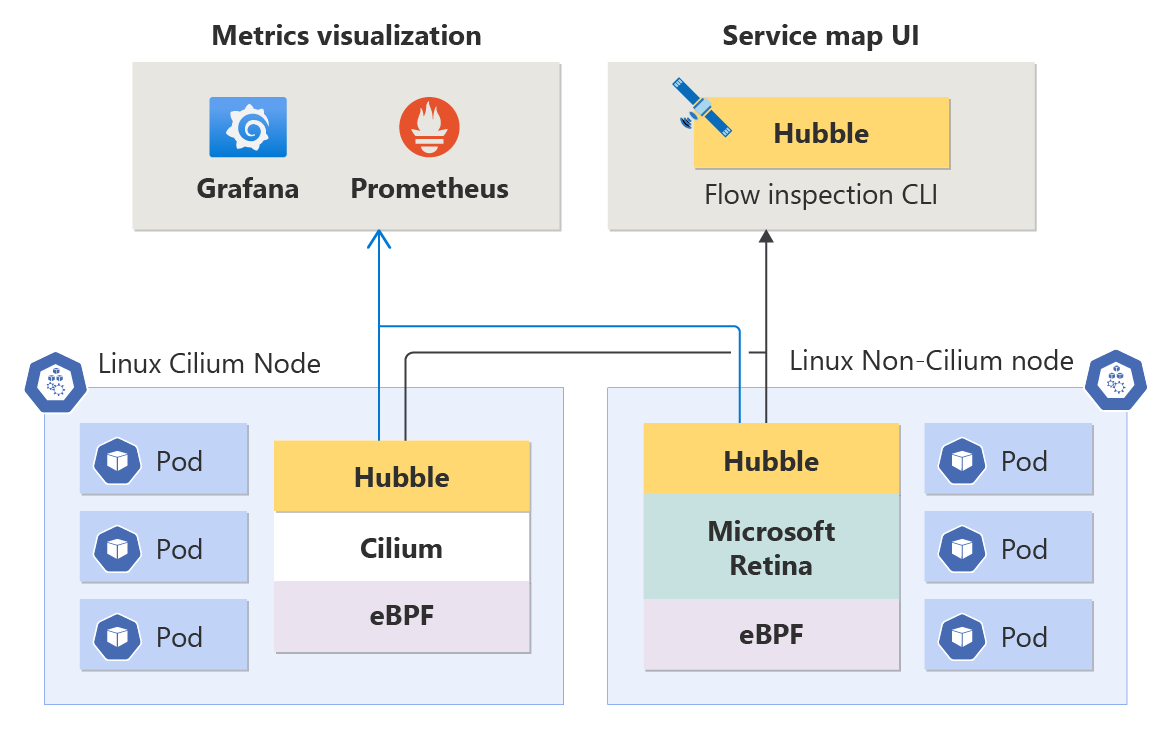
ACNS를 활성화하면 AKS가 자동으로 Hubble Proxy Pod를 클러스터에 배포합니다.
Hubble
그럼 Hubble이 뭘까요?
Cilium 프로젝트에서 만든 오픈소스 네트워크 관측성 도구입니다.
Hubble은 eBPF를 통해서 네트워크 데이터를 수집합니다.
eBPF는 Linux 커널 안에서 코드를 실행하는 기술입니다.
덕분에 애플리케이션을 수정하지 않고도 커널에 지나가는 모든 패킷을 수집할 수 있습니다.
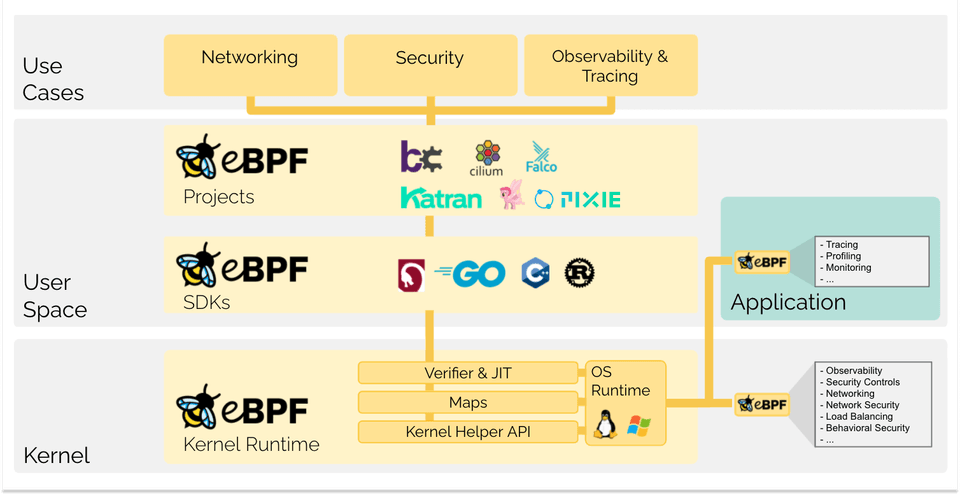
kube-proxy는 유저공간과 커널을 오가며 iptables를 거쳐야 했습니다.
eBPF는 커널 안에서 바로 처리하므로 오버헤드 없이 바로 트래픽을 관찰할 수 있습니다.
ACNS를 활성화하면 AKS 각 노드 Cilium agent에서 Hubble이 동작합니다.
Hubble Relay에서 모든 노드의 Hubble 인스턴스에서 데이터를 수집해 하나로 집계합니다.
Node 1                Node 2                Node 3
┌─────────────┐      ┌─────────────┐      ┌─────────────┐
│ Cilium Agent│      │ Cilium Agent│      │ Cilium Agent│
│  + Hubble   │      │  + Hubble   │      │  + Hubble   │
└─────────────┘      └─────────────┘      └─────────────┘
  │                         │                     │
  └─────────────────────────┴─────────────────────┘
                            │
                            ▼
                     [Hubble Relay]
                    클러스터 전체 트래픽을
                      한 곳에서 집계
Terraform으로 AKS를 구성한다는 가정하에
main.tf내 network_profile 블록에 advanced_networking을 추가합니다.
resource "azurerm_kubernetes_cluster" "aks" {
  # ... 기존 설정 ...

  network_profile {
    network_plugin      = "azure"
    network_plugin_mode = "overlay"
    network_data_plane  = "cilium"

    # ACNS 활성화 - Hubble 관측성 + 보안 기능
    advanced_networking {
      observability_enabled = true
      security_enabled      = true
    }
  }
}| 옵션 | 설명 |
| observability_enabled | Hubble 기반 네트워크 흐름 관측성 활성화 |
| security_enabled | FQDN 필터링 등 L7 보안 정책 활성화 |
Resource Provider 등록
Terraform에서 Azure Monitor와 Grafana를 생성하기 위해서 사전작업이 필요합니다.
해당 서비스의 Provider가 등록되어야 합니다.
아래 Azure CLI 명령어로 등록할 수 있습니다.
az provider register --namespace Microsoft.Monitor
az provider register --namespace Microsoft.Dashboard

# 등록 확인 (Registered 상태까지 1~2분 소요)
az provider show --namespace Microsoft.Monitor --query registrationState
az provider show --namespace Microsoft.Dashboard --query registrationState
Azure Monitor, Grafana 생성
Terraform으로 Azure Monitor와 Grafana를 생성합니다.
단, AKS와 Azure Monitor 연동은 따로 Azure CLI로 설정합니다.
azurerm provider가 이 연동을 Terraform에서 직접 지원하지 않기 때문입니다.
main.tf에서 아래 리소스를 추가합니다.
# Azure Monitor Workspace (Prometheus 메트릭 저장소)
resource "azurerm_monitor_workspace" "monitor" {
  name                = var.monitor_name
  resource_group_name = azurerm_resource_group.rg.name
  location            = azurerm_resource_group.rg.location
}

# Azure Managed Grafana
resource "azurerm_dashboard_grafana" "grafana" {
  name                  = var.grafana_name
  resource_group_name   = azurerm_resource_group.rg.name
  location              = azurerm_resource_group.rg.location
  grafana_major_version = 11

  azure_monitor_workspace_integrations {
    resource_id = azurerm_monitor_workspace.monitor.id
  }
}
variables.tf에도 아래와 같이 추가합니다.
variable "monitor_name" {
  default = "myAKSMonitor"
}

variable "grafana_name" {
  description = "Grafana 인스턴스 이름 (전 세계 유니크)"
  type        = string
}
terraform.tfvars에도 아래와 같이 추가합니다.
monitor_name = "myAKSMonitor"
grafana_name = "myUniqueGrafanaName"   # 전 세계 유니크한 이름으로 변경
이후 terraform apply 명령어도 Azure Monitor와 Grafana를 생성합니다.
Azure Monitror Metrics Addon 활성화
Terraform으로 Azure Monitor와 AKS를 연동합니다.
이 단계에서 ama-metrics Pod들이 클러스터에 배포됩니다.
aks-preview가 설치되어 있다면 --enable-azure-monitor-metrics 옵션과 충돌해,
Unsupported or missing identit type 에러가 발생합니다.
명령어 실행 전에 aks-preview를 삭제해야 합니다.
# aks-preview 확장 제거
az extension remove --name aks-preview

# Monitor, Grafana 리소스 ID를 변수에 저장
MONITOR_ID=$(az resource show \
  --resource-group myRG \
  --name ${AKSMonitor이름} \
  --resource-type "Microsoft.Monitor/accounts" \
  --query id --output tsv)

GRAFANA_ID=$(az grafana show \
  --name ${Grafana이름} \
  --resource-group ${리소스그룹이름} \
  --query id --output tsv)

# AKS에 Azure Monitor Metrics Addon 활성화
az aks update \
  --name myAKS \
  --resource-group ${리소스그룹이름} \
  --enable-azure-monitor-metrics \
  --azure-monitor-workspace-resource-id $MONITOR_ID \
  --grafana-resource-id $GRAFANA_ID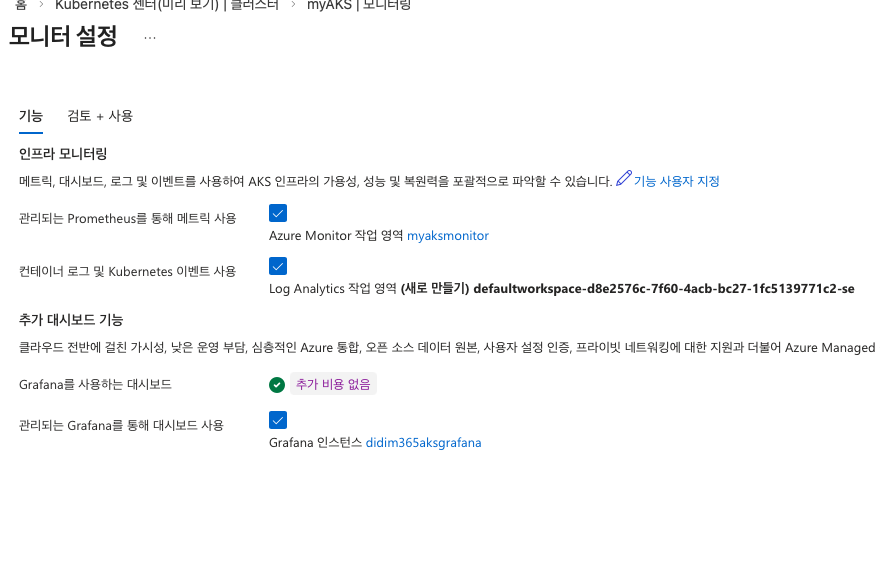
완료되면 아래 Pod들이 자동 배포됩니다.
| Pod | 역할 |
| ama-metrics | - 핵심 Metric 수집기 - Prometheus 형식으로 클러스터 Metric을 스크래핑해서 Azure Monitor로 전송 |
| ama-metrics-ksm | - Kube state 수집기 - Deployment, Pod, Node 등 K8s 오브젝트 상태 메트릭 수집 |
| ama-metrics-node | - 각 노드에 DaemonSet으로 배포. - 노드별 CPU, 메모리, 디스크, 네트워크 메트릭 수집 |
| ama-metrics-operator-targets | - 수집 대상(scrape target)을 관리. - PodMonitor, ServiceMonitor CRD를 감시해서 수집 대상 목록 업데이트 |
| ama-logs | - 메트릭이 아닌 로그 수집 담당. - Pod 로그, K8s 이벤트를 Log Analytics Workspace로 전송 |
$ kubectl get pods -n kube-system | grep ama-
ama-logs-748pz                                   3/3     Running     0               7m56s
ama-logs-8jf5z                                   3/3     Running     0               7m56s
ama-logs-gr5wf                                   3/3     Running     0               7m56s
ama-logs-rs-5798c7dbd9-qjrz5                     2/2     Running     0               7m56s
ama-metrics-b7bff497d-dx5z5                      2/2     Running     0               5m32s
ama-metrics-b7bff497d-z8bd5                      2/2     Running     0               5m32s
ama-metrics-ksm-5d4998cdcd-n4rsn                 1/1     Running     0               5m32s
ama-metrics-node-8tfvw                           2/2     Running     0               5m32s
ama-metrics-node-h6lqh                           2/2     Running     0               5m32s
ama-metrics-node-snkpt                           2/2     Running     0               5m32s
ama-metrics-operator-targets-55cb47c96c-4rd5q    2/2     Running     3 (3m47s ago)   5m32s
Hubble 메트릭 활성화
ama-metrics Pod가 떴다고 해서 Hubble 네트워크 메트릭이 바로 수집되진 않습니다.
Hubble 메트릭은 기본적으로 비활성화 상태거든요.
Hubble은 클러스터의 모든 네트워크 흐름을 추적하기 때문에 메트릭 양이 매우 많습니다.
대규모 클러스터에서는 Azure Monitor 비용이 커져서 필요한 경우에만 켜도록 설계되어 있습니다.
Azure에서 공식으로 제공하는 ama-metrics-settings-configmap.yaml 템플릿을 적용하면 활성화 가능합니다.
curl -o ama-metrics-settings.yaml https://raw.githubusercontent.com/Azure/prometheus-collector/main/otelcollector/configmaps/ama-metrics-settings-configmap.yaml

$ sed -i 's/networkobservabilityHubble = ""/networkobservabilityHubble = "hubble.*"/' ama-metrics-settings.yaml


$ grep networkobservabilityHubble ama-metrics-settings.yaml
    networkobservabilityHubble = true
    networkobservabilityHubble = "hubble.*"
    networkobservabilityHubble = "30s"

$ kubectl apply -f ama-metrics-settings.yaml -n kube-system
configmap/ama-metrics-settings-configmap created

$ kubectl rollout restart deployment ama-metrics -n kube-system
deployment.apps/ama-metrics restarted

$ kubectl rollout restart deployment ama-metrics-ksm -n kube-system
deployment.apps/ama-metrics-ksm restarted
networkobservabilityHubble = ""을 networkobservabilityHubble = "hubble.*"로 변경하면
hubble_로 시작하는 모든 메트릭이 수집됩니다.
Grafana 접근 권한 설정
Grafana 웹 화면에 접속하려면 두 가지 권한을 별도로 설정해야 합니다.
| 대상 | 목적 |
| 본인 Azure 계정 | Grafana 웹 화면에 접속하기 위한 권한 |
| Grafana 자체 | Grafana가 Azure Monitor 데이터를 읽기 위한 권한 |
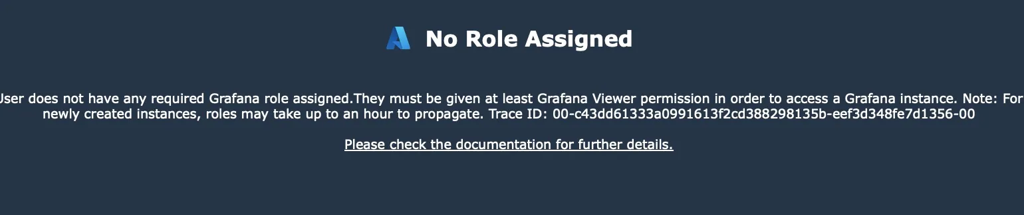
첫 번째는 Azure 본인 계정에 Grafana Admin 권한을 부여해야 합니다.
아래 Azure CLI로 쉽게 권한을 부여할 수 있습니다.
$ az role assignment create \
  --assignee $(az ad signed-in-user show --query id --output tsv) \
  --role "Grafana Admin" \
  --scope $(az grafana show \
    --name myUniqueGrafanaName \
    --resource-group myRG \
    --query id --output tsv)
두 번째는 Grafana Managed Identity에 Monitor 권한을 부여해야 합니다.
Grafana에서 Azure Monitor 데이터를 읽으려면 Grafana 자체에 Managed Identity가 필요합니다.

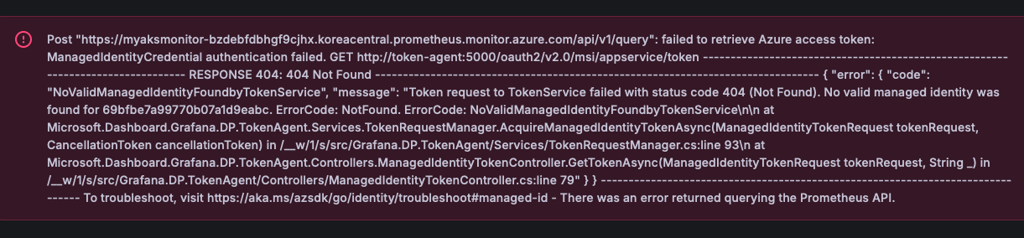
Azure Portal에서 Managed Identity 활성화해야 합니다.
아래 참고 사진처럼 Azure Portal에서 [Grafana 인스턴스] → [설정] → [ID] 페이지에 들어갑니다.
시스템 할당됨 탭에서 상태를 켬으로 저장합니다.
그리고 개체(주체) ID를 확인합니다.
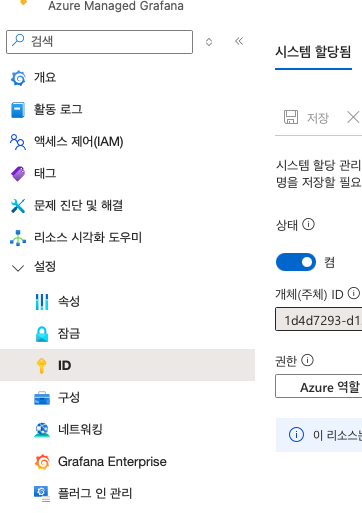
위에서 확인한 개체(주체) ID를 가지고 아래 Azure CLI를 통해서 Azure Monitor 권한을 부여합니다.
GRAFANA_IDENTITY="<화면에서 확인한 Object ID>"

MONITOR_ID=$(az resource show \
  --resource-group myRG \
  --name myAKSMonitor \
  --resource-type "Microsoft.Monitor/accounts" \
  --query id --output tsv)

az role assignment create \
  --assignee $GRAFANA_IDENTITY \
  --role "Monitoring Data Reader" \
  --scope $MONITOR_ID
그리고 아래 명령어로 대시보드 엔드포인트를 확인할 수 있습니다.
# Grafana 엔드포인트 확인
az grafana show \
  --name myUniqueGrafanaName \
  --resource-group myRG \
  --query "properties.endpoint" \
  --output tsv
Grafana 접속 후 [Dashboards] → [Azure Managed Prometheus] 폴더에 관련 대시보드들이 있습니다.
아래와 같은 대시보드를 확인할 수 있습니다.
| 대시보드 | 역할 | 필요 상황 |
| Networking/Clusters | 노드 레벨 네트워크 메트릭을 클러스터 전체 관점에서 보여줌 | 갑자기 클러스터 전체 응답이 느려졌는데 어느 노드가 문제인지 모를 때, 또는 특정 노드에 트래픽이 집중되는 것 같을 때 |
| Networking/DNS(Cluster) | 클러스터 전체 DNS 쿼리 수, 실패율, 응답 시간 | 서비스 간 연결이 간헐적으로 실패하거나 응답이 느릴 때. 애플리케이션 레벨 문제인지 DNS 레벨 문제인지 먼저 구분하고 싶을 때 |
| Networking/DNS(Workload) | 워크로드(Deployments, Daemonsets)별 DNS 메트릭 | DNS 문제가 특정 서비스에서만 발생하는 것 같을 때. 어떤 워크로드가 DNS 쿼리를 과도하게 발생시키는지, 또는 특정 서비스가 DNS 응답을 못 받고 있는지 파악하고 싶을 때 |
| Networking/Drops(Workload) | 워크로드별 패킷 드롭, 인바운드/아웃바운드 드롭 | 서비스 간 통신이 불안정하거나 타임아웃이 자주 발생할 때. NetworkPolicy를 새로 적용했는데 의도치 않게 트래픽을 차단하고 있는 건 아닌지 확인하고 싶을 때 |
| Networking/Pod Flows(Namespace) | Namespace별 L4, L7 트래픽 흐름 | 네임스페이스 간 트래픽 격리가 제대로 되고 있는지 확인하고 싶을 때. 특정 네임스페이스에서 예상치 못한 외부 통신이 발생하는지 파악하고 싶을 때 |
| Networking/Pod Flows(Workload) | 특정 Pod/Deployments 인바운드/아웃바운드 트래픽 흐름 | 신규 서비스를 배포한 후 트래픽이 예상대로 흐르는지 검증하고 싶을 때. 특정 Pod가 어디와 통신하고 있는지 추적하고 싶을 때 |
정리
AKS 클러스터의 네트워크 트래픽을 Grafana 대시보드에서 모니터링할 수 있도록 세팅하였습니다.
Hubble이 eBPF로 수집한 데이터가 Azure Monitor를 거쳐 Grafana까지의 파이프라인을 구성해 보았습니다.
특히, 패킷 드롭 대시보드는 NetworkPolicy 이슈를 디버깅할 때,
Pod Flows 대시보드는 신규 서비스 배포 후 트래픽 흐름을 검증할 때 실무에서 바로 유용하게 쓸 수 있습니다.
다음에는 AKS가 아닌 직접 구축한 k8s 클러스터에 Hubble 모니터링 체계를 구축해 보겠습니다.
[참고자료]
Advanced Container Networking Services for Azure Kubernetes Service (AKS) Overview - Azure Kubernetes Service
Learn about Advanced Container Networking Services for Azure Kubernetes Service (AKS), including features like Container Network Observability and Container Network Security.
learn.microsoft.com
GitHub - cilium/hubble: Hubble - Network, Service & Security Observability for Kubernetes using eBPF
Hubble - Network, Service & Security Observability for Kubernetes using eBPF - cilium/hubble
github.com
Customize scraping of Prometheus metrics in Azure Monitor using ConfigMap - Azure Monitor
Customize metrics scraping for a Kubernetes cluster with the metrics add-on in Azure Monitor.
learn.microsoft.com
GitHub - Azure/prometheus-collector
Contribute to Azure/prometheus-collector development by creating an account on GitHub.
github.com
'Cloud' 카테고리의 다른 글
| [Terraform] Azure AKS 클러스터 한번에 구축하기 (0) | 2026.03.22 |
|---|---|
| [Terraform] AWS EKS 한 번에 올리기(1) - VPC 구성 (0) | 2024.11.03 |
| Client VPN 구성 - Private Subnet 외부에서 접근 (0) | 2024.02.27 |
| 빠르게 더 빠르게!!! - AWS Placement Group (0) | 2023.09.13 |
| credentials 설정 안해도 되네?! - AWS EC2 IAM 연결 (0) | 2023.08.03 |


