
| 일 | 월 | 화 | 수 | 목 | 금 | 토 |
|---|---|---|---|---|---|---|
| 1 | ||||||
| 2 | 3 | 4 | 5 | 6 | 7 | 8 |
| 9 | 10 | 11 | 12 | 13 | 14 | 15 |
| 16 | 17 | 18 | 19 | 20 | 21 | 22 |
| 23 | 24 | 25 | 26 | 27 | 28 | 29 |
| 30 | 31 |
- kubernetes
- log
- Packet
- Terraform
- grafana
- AWS
- helm
- zookeeper
- Kafka
- OS
- CVAT
- docker
- MAC address
- kubectl
- JavaScript
- jvm
- CSV
- aws s3
- ip
- airflow
- Operating System
- Network
- kubeadm
- Python
- tcp
- dns
- Spring
- EC2
- java
- PostgreSQL
- Today
- Total
JUST WRITE
[Terraform] Azure AKS 클러스터 한번에 구축하기 본문

Terrafrom으로 AKS 클러스터 구축
TL;DR
- Azure VM에서 Terraform을 사용해 AKS 클러스터 + ACR을 한 번에 프로비저닝 하는 방법을 정리
- CNI는 eBPF 기반 Cilium, 디스크는 비용/성능 모두 유리한 Ephemeral 선택
- Terraform init -> plan -> apply 세 단계로 한 번에 AKS 클러스터 구축
회사에서 Azure를 경험할 수 있는 업무가 생겨서 AKS를 구축하기로 하였습니다.
이전에 Terraform으로 EKS도 쉽게 구축한 경험이 있어서,
이번에도 Terraform을 이용해 AKS를 한 번에 구축하기로 하였습니다.
[Terraform] AWS EKS 한 번에 올리기(1) - VPC 구성
AWS EKS 한 번에 올리기(1)이전에 Terraform을 통해서 Kubernetes 클러스터를 한 번에 구성한 적이 있습니다.AWS EC2 인스턴스를 여러 개 생성해서 클러스터를 구성하였습니다. 명령어 한 번에 Kubernetes 설
developnote-blog.tistory.com
AKS를 Terraform으로 구축하는 이유는 크게 세 가지입니다.
- 재현 가능성 -> 코드로 작성하면 동일한 환경을 언제든지 만들 수 있습니다.
- 변경 이력 관리 -> 인프라 변경사항을 Git으로 관리할 수 있습니다.
- 멀티 클라우드 지원 -> Azure뿐만 아니라 AWS, GCP 등 대부분의 클라우드를 동일한 문법으로 지원합니다.
전체 아키텍처
아래와 같이 Terraform으로 Azure내 AKS와 ACR를 구축하기로 하였습니다.
├── Resource Group (myRG)
│     ├── ACR ──────────────────────────┐
│     │   (프라이빗 컨테이너 레지스트리)    │
│     │                                  │ AcrPull 권한
│     └── AKS Cluster                   │
│           ├── Control Plane ◀── Azure 관리
│           └── Worker Node × 3 ────────┘
│                 ├── Node 1 (Standard_D8s_v3)
│                 ├── Node 2 (Standard_D8s_v3)
│                 └── Node 3 (Standard_D8s_v3)
│                       └── Cilium CNI (eBPF)
│
└── Terraform State (.tfstate, 로컬 저장)
ACR(Azure Container Registry)
ACR은 Azure에서 제공하는 Private 컨테이너 이미지 레지스트리입니다.
Docker Hub와 동일한 역할을 하지만 외부에 공개되지 않는 Private 저장소입니다.
AKS Pod 생성 시 ACR에서 이미지를 pull 해서 컨테이너를 생성하려고 합니다.
사내 서비스 이미지를 외부에 공개하지 않고 Azure 내부 네트워크에서만 접근할 수 있습니다.
ACR과 AKS와 같은 리전에 있으면 Azure 내부 네트워크를 통해 이루어져 훨씬 빠릅니다.
AKS(Azure Kubernetes Service)
AKS는 Azure에서 제공하는 관리형 Kubernetes 서비스입니다.
Kubernetes의 Control Plane을 Azure가 직접 관리해 줍니다.
AKS의 구조는 크게 두 계층으로 나눠집니다.
- Control Plane
- API 서버, 스케줄러, etcd(상태 저장소), Controller Manager로 구성
- Azure가 전담 관리
- Worker Node
- 실제 Pod이 생성되는 VM
- 이번 구성에서는 Standard_D8s_v3 VM 3대로 구성
기본 세팅
Azure에서 Koreacentral 리전에 Terraform을 실행할 VM을 생성하였습니다.
가장 기본적인 스펙으로 Ubuntu 기반 VM을 생성하였습니다.
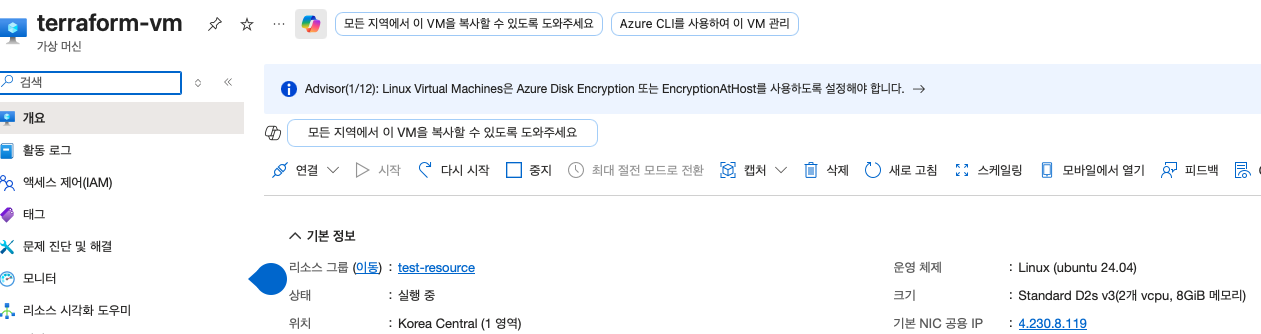
Terraform으로 AKS 구축하기에 앞서 필요한 도구들을 VM에 설치합니다.
- Azure CLI
- Terraform
- kubectl
# 1. 패키지 업데이트
sudo apt update && sudo apt upgrade -y

# 2. Azure CLI 설치
curl -sL https://aka.ms/InstallAzureCLIDeb | sudo bash

# 3. Terraform 설치
wget -O- https://apt.releases.hashicorp.com/gpg | sudo gpg --dearmor -o /usr/share/keyrings/hashicorp-archive-keyring.gpg
echo "deb [signed-by=/usr/share/keyrings/hashicorp-archive-keyring.gpg] https://apt.releases.hashicorp.com $(lsb_release -cs) main" | sudo tee /etc/apt/sources.list.d/hashicorp.list
sudo apt update && sudo apt install terraform -y

# 4. kubectl 설치
curl -LO "https://dl.k8s.io/release/$(curl -L -s https://dl.k8s.io/release/stable.txt)/bin/linux/amd64/kubectl"
sudo install -o root -g root -m 0755 kubectl /usr/local/bin/kubectl

$ az version
{
  "azure-cli": "2.84.0",
  "azure-cli-core": "2.84.0",
  "azure-cli-telemetry": "1.1.0",
  "extensions": {}
}

$ terraform version
Terraform v1.14.7
on linux_amd64

$ kubectl version --client
Client Version: v1.35.3
Kustomize Version: v5.7.1
위의 명령어들을 통해 필요한 도구 설치가 끝났습니다.
Azure 로그인
이제 Terraform을 통해 AKS 설치할 Azure 계정에 로그인합니다. Azure CLI를 통해 로그인합니다.
--user-device-code 옵션을 주면 URL과 인증코드를 알려줍니다.
https://login.microsoft.com/device로 들어가서 인증 코드 입력 후 Azure 로그인을 하면 됩니다.
그럼 아래와 같이 로그인되고 계정 정보를 확인할 수 있습니다.
$ az login --use-device-code
To sign in, use a web browser to open the page https://login.microsoft.com/device and enter the code ****** to authenticate.

# 웹브라우저에서 코드 입력 후 로그인 확인
Retrieving tenants and subscriptions for the selection...

[Tenant and subscription selection]

No     Subscription name    Subscription ID                       Tenant
-----  -------------------  ------------------------------------  ------------
[1] *  ******               ********-****-****-****-************  ******

The default is marked with an *; the default tenant is '******' and subscription is '******' (********-****-****-****-************).

Select a subscription and tenant (Type a number or Enter for no changes):

Tenant: ******
Subscription: ****** (********-****-****-****-************)

[Announcements]
With the new Azure CLI login experience, you can select the subscription you want to use more easily. Learn more about it and its configuration at https://go.microsoft.com/fwlink/?linkid=2271236

If you encounter any problem, please open an issue at https://aka.ms/azclibug

[Warning] The login output has been updated. Please be aware that it no longer displays the full list of available subscriptions by default.
그리고 Resource Provider을 등록합니다.
Azure에서 제공하는 서비스는 Resource Provider라는 단위로 관리됩니다.
Azure 구독에서 특정 서비스를 처음 사용하려면 해당 Resource Provider가 구독에 등록돼야 합니다.
# 필요한 Provider만 직접 등록
az provider register --namespace Microsoft.ContainerService
az provider register --namespace Microsoft.ContainerRegistry
az provider register --namespace Microsoft.Compute
az provider register --namespace Microsoft.Network

# 등록 확인 (Registered 상태인지 확인)
az provider show --namespace Microsoft.ContainerService --query registrationState
az provider show --namespace Microsoft.ContainerRegistry --query registrationState
Terraform은 기본적으로 terraform apply 실행 시 필요한 Resource Provider를 자동으로 등록합니다.
그러나 자동 등록 과정이 완료될 때까지 대기하면서 지연되는 현상이 발견되었습니다.
필요한 Provider를 직접 수동으로 등록하고 main.tf에 Provider 자동 등록을 비활성하였습니다.
resource_provider_registration = "none"Terraform 파일 작성
총 4가지를 파일을 작성하며, 같은 path에 위치시킵니다.
| 파일 | 역할 |
| main.tf | - 실제 Azure 리소스를 정의하는 핵심 파일 - 어떤 리소스를 만들지 선언 |
| variables.tf | - main.tf에서 사용할 변수를 선언하는 파일 - 파일, 변수명, 타입, 기본값, 설명을 정의 |
| terraform.tfvars | - variables.tf에서 선언한 변수의 실제 값을 지정하는 파일 - 환경마다 다르게 관리할때 유용 |
| ouputs.tf | - terraform apply 완료 후 터미널에 출력할 값 정의 - ACR 주소 등 |
main.tf
main.tf는 실제로 생성할 Azure 리소스를 선언하는 핵심 파일입니다.
주요 항목은 아래와 같습니다.
- terraform 블록
- Terraform 자체 설정
- 사용할 Terraform 최소 버전과 Azure Provider 버전 고정
- provider "azurerm" 블록
- Azure 인증하고 연결하는 설정
- resource_provider-registration = "non"으로 Resource Provider 자동 등록 비활성화
- azurerm_resource_group
- Azure 모든 리소스는 Resource Group에 속해야 하는데 AKS, ACR이 해당 Resource Group에 속함
- azurerm_container_registry
- Private 이미지 저장소인 ACR 설정
- sku = "Standard"는 운영 환경에 적합한 100GB 스토리지 제공
- azurerm_kubernetes_cluster
- 주요 항목인 AKS 설정
| 항목 | 설명 |
| default_node_pool | - Worker 노드 구성 - vm_size -> 노드 스펙 - node_count -> 노드 수 |
| os_disk_type = "Ephemeral" | - VM 로컬 SSD를 디스크로 사용 - Managed 디스크보다 빠름 |
| network_plugin = "azure" | - Cilium 사용을 위한 CNI 기반 설정 |
| network_plugin_mode = "overlay" | - Pod IP를 VNetIP와 분리 - IP 고갈 문제를 방지 |
| network_data_plane = "cilium" | - eBPF 기반 고성능 네트워킹 - kube-proxy 없이 동작해 Latency 감소 |
| identity = "SystemAssigned" | - Managed Identity tkdyd - Azure 리소스 접근 시 별도 Secret 없이 인증 가능 |
- azurerm_role_assignment
- AKS가 ACR에서 이미지 pull할 수 있도록 권한 부여
terraform {
  required_version = ">= 1.5.0"
  required_providers {
    azurerm = {
      source  = "hashicorp/azurerm"
      version = "~> 4.0"
    }
  }
}

provider "azurerm" {
  features {}
  resource_provider_registrations = "none"
}

resource "azurerm_resource_group" "rg" {
  name     = var.resource_group_name
  location = var.location
}

resource "azurerm_container_registry" "acr" {
  name                = var.acr_name
  resource_group_name = azurerm_resource_group.rg.name
  location            = azurerm_resource_group.rg.location
  sku                 = "Standard"
}

resource "azurerm_kubernetes_cluster" "aks" {
  name                = var.aks_name
  location            = azurerm_resource_group.rg.location
  resource_group_name = azurerm_resource_group.rg.name
  dns_prefix          = var.aks_name

  default_node_pool {
    name            = "default"
    node_count      = var.aks_node_count
    vm_size         = var.aks_node_vm_size
    os_disk_size_gb = 128
    os_disk_type    = "Ephemeral"
  }

  network_profile {
    network_plugin      = "azure"
    network_plugin_mode = "overlay"
    network_data_plane  = "cilium"
  }

  identity {
    type = "SystemAssigned"
  }

  automatic_upgrade_channel = "patch"
  node_os_upgrade_channel   = "NodeImage"
  sku_tier                  = "Standard"
}

resource "azurerm_role_assignment" "aks_acr_pull" {
  principal_id                     = azurerm_kubernetes_cluster.aks.kubelet_identity[0].object_id
  role_definition_name             = "AcrPull"
  scope                            = azurerm_container_registry.acr.id
  skip_service_principal_aad_check = true
}
AKS에서 사용할 수 있는 CNI는 kubenet, Azure CNI, Cillium 등 여러 가지가 있습니다.
이번에 Cilium을 선택한 이유는 아래와 같습니다.
- eBPF(extended Berkeley Packet Filter) 기반 고성능 네트워킹
- 보통 kube-proxy를 통해 iptables 규칙을 거치지만 Cilium은 eBPF를 사용해 커널 레벨에서 직접 패킷을 처리해 Latency가 감소합니다.
- 강력한 Network Policy
- 기본은 L3/L4 레벨만 제어하지만 Cilium은 HTTP, gRPC 같은 L7 레벨까지 트래픽 제어가 가능합니다.
- Hubble을 통한 관측성
- Cilium에 내장된 Hubble을 활성화하면 서비스 간 트래픽 흐름 실시간 시각화가 가능합니다.
AKS 노드의 디스크는 Managed와 Ephemeral 두 가지 방식이 있습니다.
이번에는 속도가 빠른 Ephemeral 디스크를 사용하였습니다.
두 디스크의 차이점은 아래와 같습니다.
| 항목 | Managed | Ephemeral |
| 저장 위치 | Azure Storage | VM 로컬 SSD |
| I/O 속도 | 보통 | 빠름 |
| 추가 비용 | 있음 | 없음(VM 비용에 포함0 |
| 노드 삭제 시 | 디스크 유지 | 디스크 함께 삭제 |
variables.tf
variable "resource_group_name" {
  default = "****"
}

variable "location" {
  default = "koreacentral"
}

variable "acr_name" {
  description = "ACR 이름 (전 세계 유니크)"
  type        = string
}

variable "aks_name" {
  default = "****"
}

variable "aks_node_count" {
  default = 3
}

variable "aks_node_vm_size" {
  default = "Standard_D8s_v3"
}
outputs.tf
output "acr_login_server" {
  value = azurerm_container_registry.acr.login_server
}

output "kube_config_command" {
  value = "az aks get-credentials --resource-group ${var.resource_group_name} --name ${var.aks_name}"
}
terraform.tfvars
resource_group_name = "****"
location            = "koreacentral"
acr_name            = "*****"
aks_name            = "*****"
aks_node_count      = 3
aks_node_vm_size    = "Standard_D8s_v3"
Terraform 실행
이제 준비가 완료되었습니다.
Terraform은 인프라를 적용하기까지 아래 3단계 명령어를 순서대로 실행합니다.
| 명령어 | 역할 |
| terraform init | Provider 플로그인 다운로드 및 초기화 |
| terraform plan | 현재 상태와 코드를 비교해 변경사항 미리보기, 실제 인프라 영향 없음 |
| terraform apply | plan 결과를 실제 Azure에 적용 |
terraform init
$ terraform init
Initializing the backend...
Initializing provider plugins...
- Finding hashicorp/azurerm versions matching "~> ****"...
- Installing hashicorp/azurerm v****...
- Installed hashicorp/azurerm v**** (signed by HashiCorp)
Terraform has created a lock file .terraform.lock.hcl to record the provider
selections it made above. Include this file in your version control repository
so that Terraform can guarantee to make the same selections by default when
you run "terraform init" in the future.

Terraform has been successfully initialized!

You may now begin working with Terraform. Try running "terraform plan" to see
any changes that are required for your infrastructure. All Terraform commands
should now work.

If you ever set or change modules or backend configuration for Terraform,
rerun this command to reinitialize your working directory. If you forget, other
commands will detect it and remind you to do so if necessary.
terraform plan
$ terraform plan

Terraform used the selected providers to generate the following execution plan. Resource actions are indicated with the following
symbols:
  + create

Terraform will perform the following actions:

  # azurerm_container_registry.acr will be created
  + resource "azurerm_container_registry" "acr" {
      + admin_enabled                 = false
      + admin_password                = (sensitive value)
      + admin_username                = (known after apply)
      + data_endpoint_host_names      = (known after apply)
      + encryption                    = (known after apply)
...
...
...
Note: You didn't use the -out option to save this plan, so Terraform can't guarantee to take exactly these actions if you run "terraform
apply" now.
terraform apply
Do you want to perform these actions? 메시지가 나오면 yes를 입력하면 됩니다.
$ terraform apply

Do you want to perform these actions?


Outputs:
acr_login_server    = "xxxxxx.azurecr.io"
kube_config_command = "az aks get-credentials --resource-group myRG --name *****"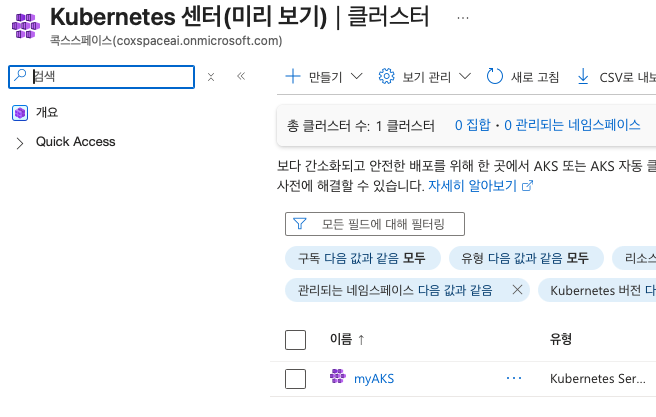
kubectl 설정 및 자동 완성
이제 AKS에 kubectl로 접근할 수 있도록 설정합니다.
# kubeconfig 설정
az aks get-credentials --resource-group myRG --name myAKS

# kubectl 자동완성 설정
kubectl completion bash | sudo tee /etc/bash_completion.d/kubectl > /dev/null
sudo apt install bash-completion -y

# alias 설정
echo 'alias k=kubectl' >> ~/.bashrc
echo 'complete -o default -F __start_kubectl k' >> ~/.bashrc

# 적용
exec bash
설정 후 kubectl 명령어로 AKS 클러스터를 확인합니다.
$ k get no
NAME                              STATUS   ROLES    AGE     VERSION
aks-default-41983717-vmss000000   Ready    <none>   8m1s    v1.33.7
aks-default-41983717-vmss000001   Ready    <none>   7m49s   v1.33.7
aks-default-41983717-vmss000002   Ready    <none>   7m56s   v1.33.7
정리
Terraform으로 활용해서 ACR과 AKS를 구축하였습니다.
코드 한번만 잘 설정하면 손쉽게 AKS를 구축할 수 있어 인프라 관리에 꼭 필요하다는 생각이 들었습니다.
다음 포스팅에서는 구축한 AKS를 살펴보고 ACR에 있는 이미지를 pull 받는 것을 정리하겠습니다.
[참고자료]
'Cloud' 카테고리의 다른 글
| [Azure] AKS에 Grafana 모니터링 구축하기 (0) | 2026.04.12 |
|---|---|
| [Terraform] AWS EKS 한 번에 올리기(1) - VPC 구성 (0) | 2024.11.03 |
| Client VPN 구성 - Private Subnet 외부에서 접근 (0) | 2024.02.27 |
| 빠르게 더 빠르게!!! - AWS Placement Group (0) | 2023.09.13 |
| credentials 설정 안해도 되네?! - AWS EC2 IAM 연결 (0) | 2023.08.03 |


